FormsDB for Elementor Forms is a powerful addon that automatically stores form submissions in Google Sheets or WordPress Posts. It acts as a bridge between Elementor Forms and Google Sheets, storing each submission immediately after the user clicks the submit button, keeping your data organized, accessible, and always up to date.
Install Free Version
- Log in to your WordPress dashboard.
- Navigate to the Plugins section.
- Search for the “
Elementor” or“FormsDB for Elementor Forms”plugin.
(Note: FormsDB for Elementor Forms works with Elementor’s Form Builder. If you don’t have Elementor Pro, you must install Hello Plus along with Elementor Free to use forms).
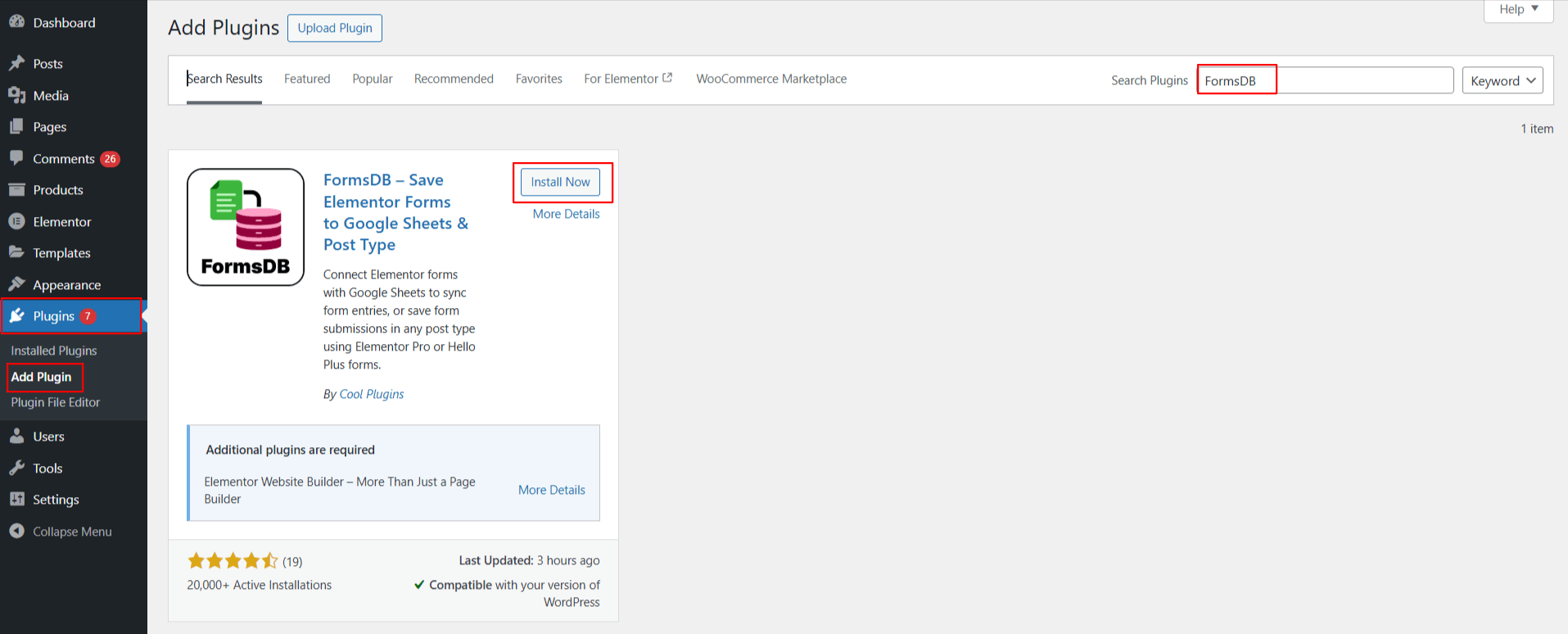
- Install and activate them.
That’s it! FormsDB for Elementor Forms plugin is installed and activated.
Access FormsDB Settings
After activation:
- From your WordPress dashboard, navigate to Elementor > FormsDB.
- Here, you can manage all form integrations by accessing following sections:
- Forms to Sheets
- Forms to Post Type
- Settings
- Old Submissions (Only for users upgrading from older versions)
