FormsDB for Elementor Forms allows you to automatically sync every Elementor form submission to Google Sheets in real time. Once connected, each new submission is added as a new row in your selected spreadsheet, keeping your data organized, accessible, and always up to date.
Follow the steps below to configure your Elementor form to automatically send data to Google Sheets:
Google Sheets Integration
- Edit your Form with Elementor.
- Navigate to the Action after submit section below the Form Fields.
- From the dropdown list, select Save Submissions in Google Sheet.
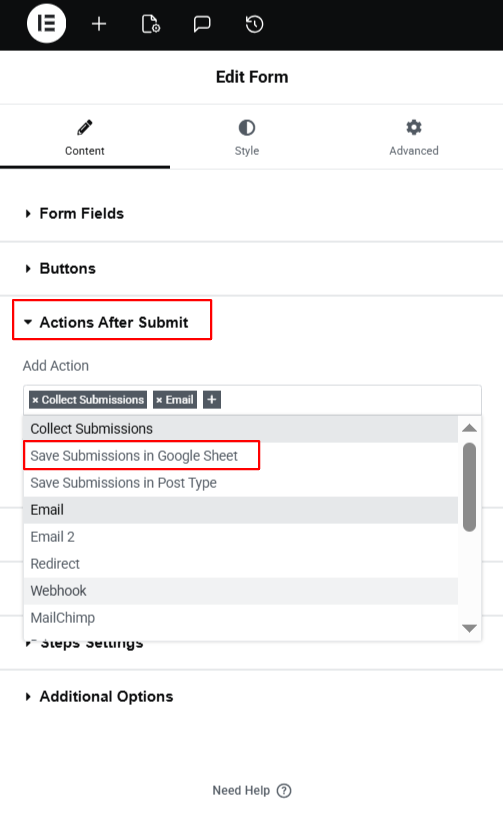
- A new panel called Save submissions in Google Sheet will appear.
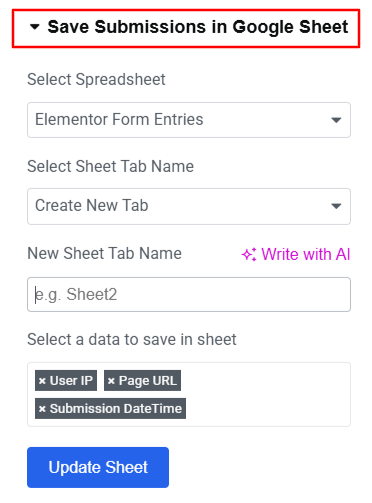
Configure Settings
- Select the Google Spreadsheet where you want to store the form entries.
- Enter the Sheet Tab Name.
- Next, select the form data you want to save in the sheet.
- Click Update Sheet to apply the settings.
- After satisfied, publish your page.
Now, every time the form is submitted, the data will be automatically saved to Google Sheets.