

A Country Code field helps international users select their country code from a pre-defined list. You can easily add a country code field to your Divi form module using Contact Form Extender for Divi plugin.
Why Use Country Code Field?
Adding a country code input field improves both the accuracy and usability of your forms, especially for an international audience.
For example, a user from Spain might enter their number as “612 34 56 78″, which works locally but is not valid in an international format. With a country code dropdown, the user can simply select the country code “ (+34)” from the dropdown and enter their number. The form then automatically stores it as “+34 612 34 56 78”, reducing input errors.
Follow the steps below to add a country code dropdown to your form:
Add Country Code Field
* Firstly, make sure you have “Turned on“ the country code field feature in the WordPress Admin Panel >> Divi >> Contact Form Extender >> Form Elements Tab.
- From the Elements section, click on the edit (pencil icon) of the field.
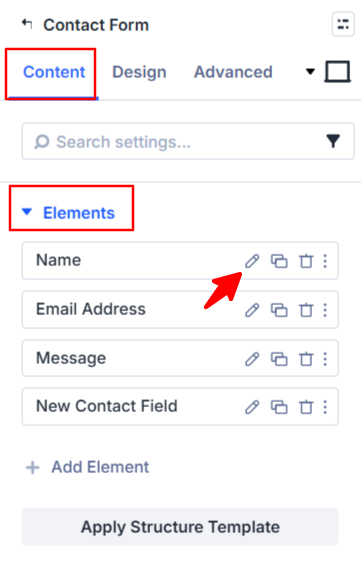
- Field settings will open.
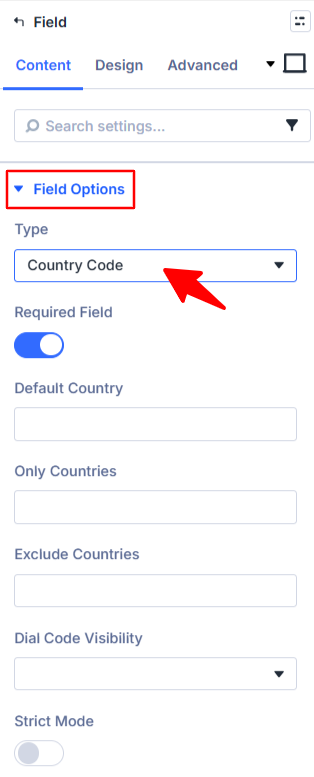
- Scroll down to the Field Options section.
- Type: Choose Country Code as the field type.
- Default Country: Set the default country to define which country should appear pre-selected in the country code or country dropdown when the form is first loaded.
- Only Countries: Mention the list of countries that you want to include in the dropdown list. All other countries will be hidden.
- Exclude Countries: Mention the list of countries that you don’t want to appear in the dropdown.
- Dial Code Visibility: Controls the visibility of the country code. Choose whether you want to show only the code (+91) or show both country name and code.
- Strict Mode: Toggle on strict mode to make sure users enter valid phone numbers based on the selected country.
- After being satisfied with all the changes, click Save to apply the changes to your form.