


You can easily add a Calculator Field in the Divi Contact form using the Contact Form Extender for Divi plugin for dynamic and real-time calculations.
What is a Calculator Field?
A Calculator Field is a smart form input that automatically performs calculations based on the values users enter using predefined formulas.
Imagine you run a real estate website offering loan services. Rather than asking visitors to calculate EMIs on their own or sending them to another tool, you can include a built-in loan calculator directly in your form. As users enter details like loan amount, interest rate, and tenure, the result updates instantly.
You can also use calculator fields for other purposes, such as loan estimations, BMI calculations, pricing breakdowns, or service cost estimates.
Follow these simple steps to add a calculator field to Divi form:
Add Calculator Field
* Firstly, make sure you have “Turned on“ the calculator field feature in the WordPress Admin Panel >> Divi >> Contact Form Extender >> Form Elements Tab.
- From the Elements section, click on the edit (pencil icon) of the field.
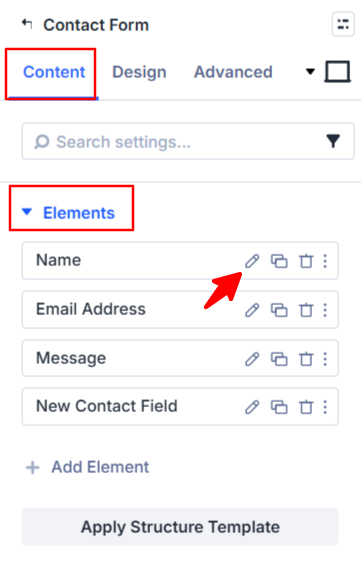
- Field settings will open.
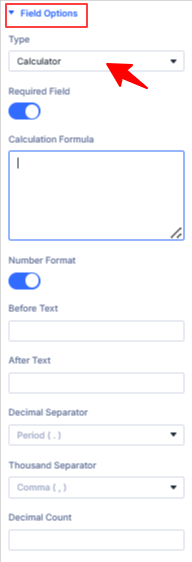
- Scroll down to the Field Options section.
- Type: Choose calculator as the field type.
- Calculation Formula: Enter the formula for your calculation using the IDs of your form fields. For example:
[field1] * [field2] + [field3] - Number Format: Enable this option to display the result in a properly formatted number style (like currency or decimals).
- Before Text: Add a prefix that appears before the calculated value, such as a currency symbol like
$or€. - After Text: Add a suffix or unit after the calculated value, for example, “
USD” or “per month”. - Decimal Separator: Select a decimal separator: either a
period (.)or acomma (,)based on your requirement. - Thousand Seperator: Choose the symbol to separate thousands in large numbers: either a
period (.)or acomma (,)based on your requirement. - Decimal Count: Specify how many digits should be shown after the decimal separator.
- After being satisfied with all the changes, click Save to apply the changes to your form.