

You can easily add an advanced input field that formats and validates currency values, making it easy for users to enter amounts accurately, using the Contact Form Extender for Divi plugin.
What is Currency Field?
A Currency Field is a special type of form field designed specifically for collecting money-related input accurately. Instead of letting users type anything (like text, symbols, or wrong values), a currency field ensures that the input is always in a proper format.
For example, if a user enters “5000,” it will be automatically formatted as “$5,000.00” (depending on the selected currency).
Follow these simple steps to add a currency field to a Divi form:
Add Currency Field
* Firstly, make sure you have “Turned on“ the currency field feature in the WordPress Admin Panel >> Divi >> Contact Form Extender >> Form Elements Tab.
- From the Elements section, click on the edit (pencil icon) of the field.
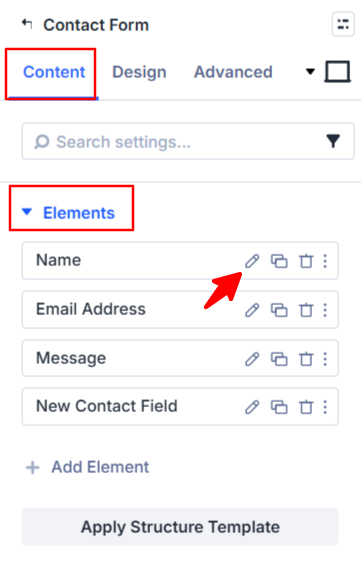
- Field settings will open.
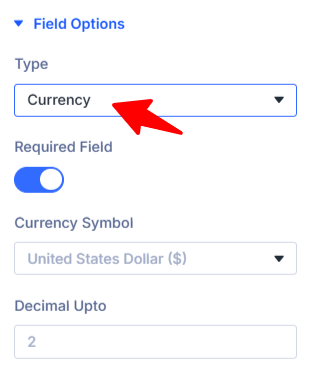
- Scroll down to the Field Options section.
- Type: Choose currency as the field type.
- Currency Symbol: Choose the currency symbol to be displayed (e.g., US Dollar).
- Decimal upto: Sets how many decimal places are allowed. For example, 2 means values like
100.00are accepted.
- After being satisfied with all the changes, click Save to apply the changes to your form.