


A Searchable Select Field is an improved dropdown field that includes a search bar, allowing users to search and find the options from the dropdown list.
You can easily add a searchable select field inside the native Divi contact form using the Contact Form Extender for Divi plugin.
Why Use a Searchable Select Field?
A Searchable Select field is not just a dropdown; it’s a smarter, faster, and more user-friendly way for visitors to interact with your form. Instead of making users scroll through long lists, a searchable select field allows them to simply search the options.
For example, if your form includes a country selection with a long list of options, with a searchable select field, users can just type “India” and instantly see India instead of scrolling through the entire list. This makes the form quicker to use, reduces effort, and creates a smoother experience for users.
Add Searchable Select Field
Follow these simple steps to add a select field:
* Firstly, make sure you have “Turned on“ the select field feature in the WordPress Admin Panel >> Divi >> Contact Form Extender >> Form Elements Tab.
- From the Elements section, click on the edit (pencil icon) of the field.
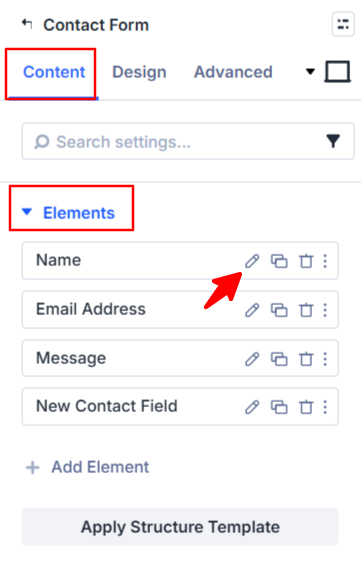
- Field settings will open.
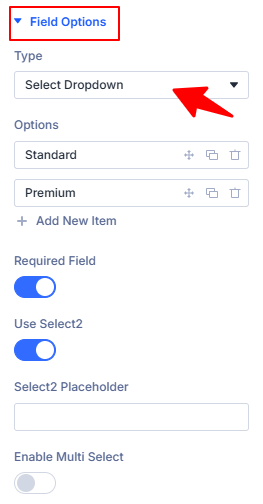
- Scroll down to the Field Options section.
- Type: Choose Select Dropdown as the field type.
- Options: Add your dropdown options.
- Use Select2: Toggle the “SELECT2” switch to add a searchable dropdown.
- Select2 Placeholder: Add placeholder text for the field.
- Enable Multi Select: Turn this on if you want users to select more than one option from the dropdown.
- After being satisfied with all the changes, click Save to apply the changes to your form.