


Using Contact Form Extender for Divi plugin, you can easily add signature field directly inside Divi contact form.
What is Signature Field?
A Signature Field is a form field that allows users to draw their signature directly inside a form using their mouse, touchpad, or mobile screen.
Imagine your form requires consent, verification, or authorization, such as service agreements, delivery confirmations, or waivers. So, instead of requiring users to print, sign, scan, or upload documents, the Signature Field makes the process fast, digital, and legally recognized.
Follow the steps below to add a signature field to your form:
Add Signature Field
* Firstly, make sure you have “Turned on“ the signature field feature in the WordPress Admin Panel >> Divi >> Contact Form Extender >> Form Elements Tab.
- From the Elements section, click on the edit (pencil icon) of the field.
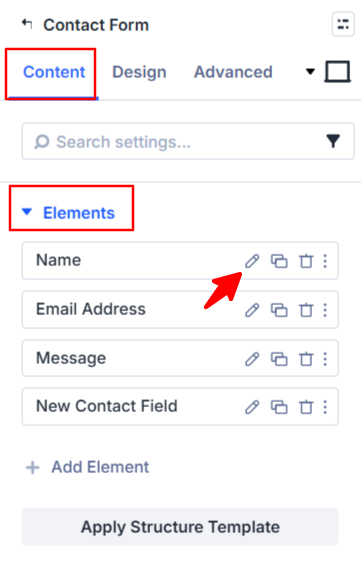
- Field settings will open.
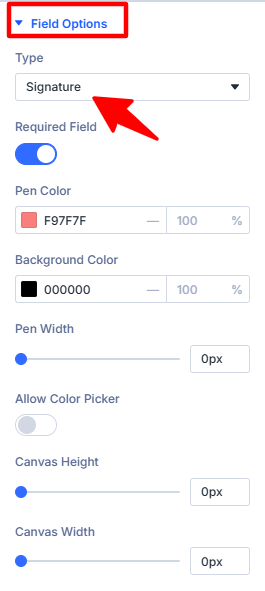
- Scroll down to the Field Options section.
- Type: Select Signature as the field type.
- Pen Color: Adjust the pen color of the signature pad.
- Background Color: Adjust the background color of the signature pad.
- Pen Width: Adjust the pen thickness using the pen width setting.
- Allow Color Picker: Turn this on if you want users to choose their own pen color while signing.
- Canvas Height: Adjust the overall height of the signature pad.
- Canvas Width: Adjust the overall width of the signature pad.
- After being satisfied with all the changes, click Save to apply the changes to your form.