

Using Contact Form Extender for Divi plugin, you can easily add a visual text editor that lets users format content easily in your Divi Forms.
What is WYSIWYG?
A WYSIWYG (What You See Is What You Get) editor is a visual editing tool that allows you to create and format text content directly within a form, similar to editing in Word or Google Docs. Instead of writing code, users can bold text, add links, create bullet points, and more directly from a visual toolbar.
Follow these simple steps to add a WYSIWYG field to a Divi form:
Add WYSIWYG Field
* Firstly, make sure you have “Turned on“ the WYSIWYG field feature in the WordPress Admin Panel >> Divi >> Contact Form Extender >> Form Elements Tab.
- From the Elements section, click on the edit (pencil icon) of the field.
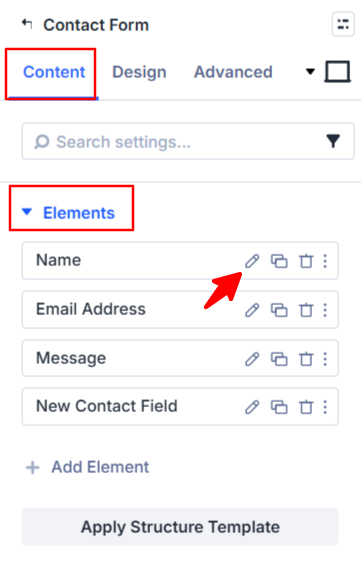
- Field settings will open.
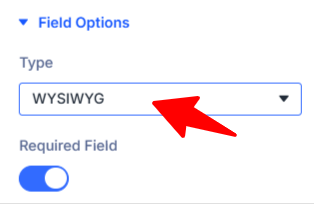
Scroll down to the Field Options section.
- Type: Choose WYSIWYG as the field type.
- Publish or save your page.
That’s it, the WYSIWYG field will be successfully added to your Divi Forms.