

If you want to add an image radio field to your native Divi contact form, then you can add it easily using the Contact Form Extender for Divi plugin.
What is Image Radio Field?
An image radio field is a form element that replaces the traditional circular radio button with a clickable image. It allows users to select an option by clicking on an image instead of plain text, behaving like a standard radio button; only one selection is allowed, but each option is represented visually.
Follow the steps below to add an image radio field to your form:
Add Image Radio Field
* Firstly, make sure you have “Turned on“ the image radio field feature in the WordPress Admin Panel >> Divi >> Contact Form Extender >> Form Elements Tab.
- From the Elements section, click on the edit (pencil icon) of the field.
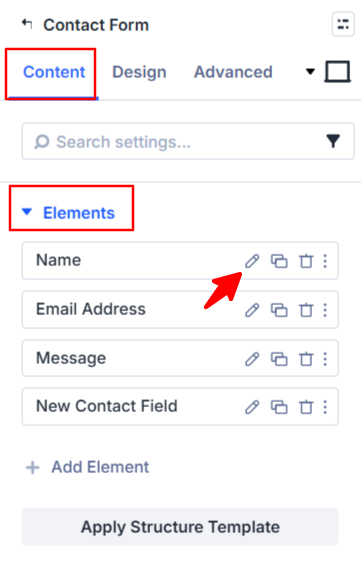
- Field settings will open.
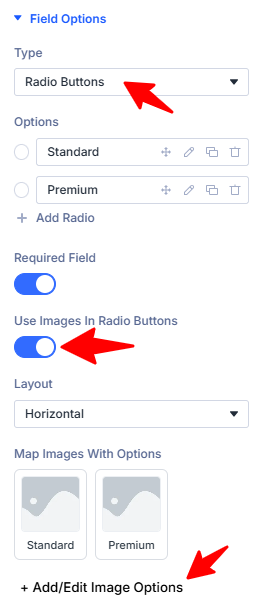
- Scroll down to the Field Options section.
- Type: Select the radio button as the field type.
- Options: Add the radio button choices that will be shown to users.
- Use Images in Radio Buttons: Enable this option to add an image radio field.
- Layout: Select vertical or horizontal style for the image radio according to your requirements.
- Map images with Options: Link image or icon to each checkbox/radio option so when a user clicks the image, the correct option gets selected.
- Add / Edit image Options: Upload an image or select an icon to visually represent each option.
- After clicking add/edit image options popup will open, here:
- Choose Field: Select the field option for which you want to assign an image or icon.
- Image or Icon: Choose whether you want to use an image or an icon for the selected option.
- Icon Class: If you select an icon, enter the icon class.
- Image URL: Add the image link or click Select Image to upload from your media library.
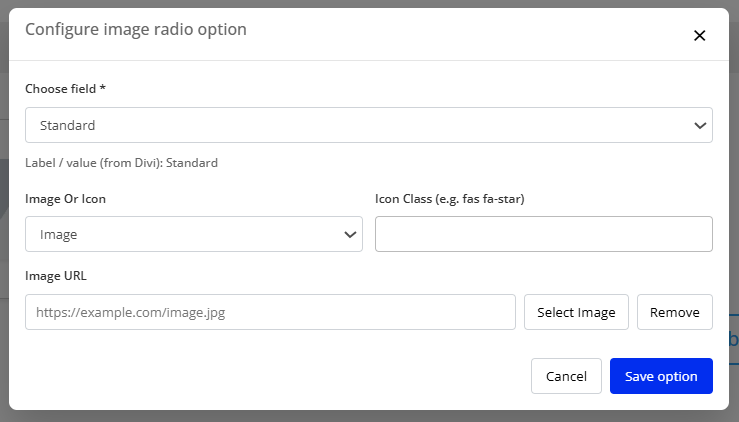
- After being satisfied with all the changes, click Save to apply the changes to your form.