FormsDB for Elementor Forms lets you automatically save Elementor form submissions as WordPress posts or custom post types. Each form submission is saved as a new post, keeping your data secure and fully manageable from the WordPress dashboard.
Follow the steps below to configure your Elementor form to automatically save submissions to any post type:
WordPress Post Type Integration
- Edit your Form with Elementor.
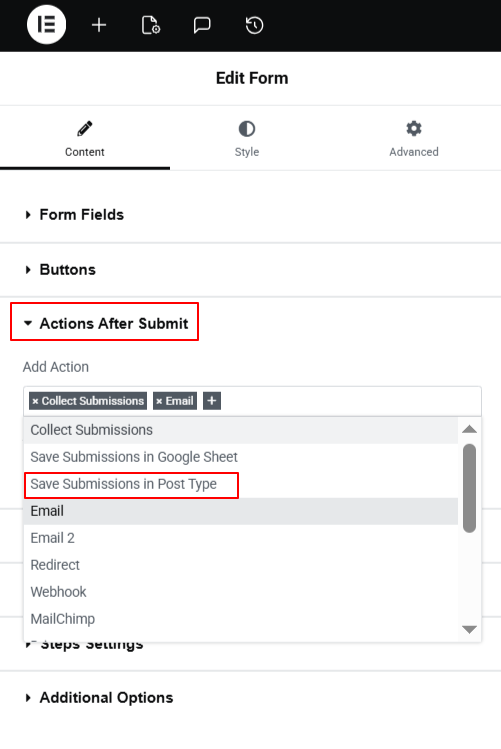
- Navigate to the Action after submit section below the Form Fields.
- From the dropdown list, select Save Submissions in Post Type.
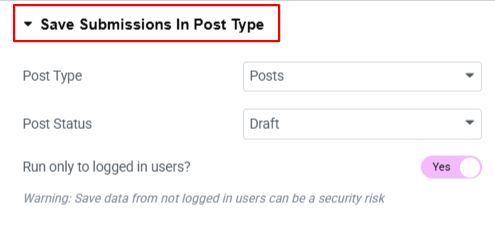
- A new panel called Save submissions in Post Type will appear.
Configure Settings
- Post Type: Choose where the form data will be stored in WordPress: Posts, Pages, Media, Floating Elements , or My Templates.
- Post Status: Choose the visibility status of your selected post type.
- Enable Run only to logged in users option, if you want only logged-in users to submit the form and save submissions as posts.
- After enabling Save Submissions in Post Type, the next step is to map your form fields to WordPress post fields.
- Navigate to the “Advanced Tab” of the form field that you want to register.
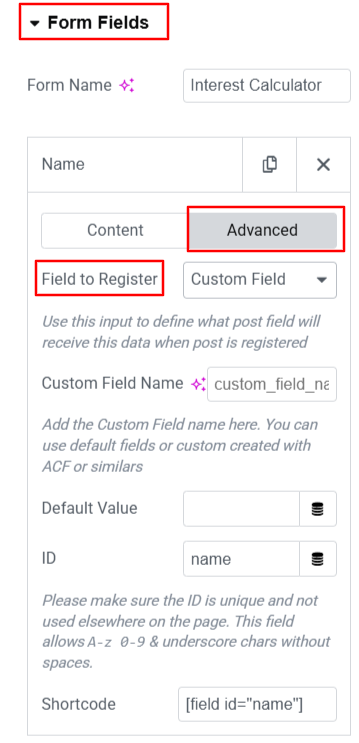
- From the registration options, choose how the field data should be saved: Post Title, Post Content, Post Author, Post Excerpt, or Custom Field.
- If you select Custom Field, simply enter a name for the field. FormsDB will automatically create and store this custom field for the post.
- Follow the same steps for each form field you want to save as part of the post.
- After satisfied, publish your page.
Now, every time the form is submitted, the data will be automatically saved to selected WordPress Posts Type.