

Using Contact Form Extender for Divi plugin, you can easily add a toggle field to your form.
What is a Toggle Field?
A Toggle field is an input element that allows users to switch between two options, like ON or OFF, Yes or No. Unlike a checkbox, it helps users to quickly enable or disable a setting, agree or disagree with something, or make any simple choice without extra clicks.
Follow these simple steps to add a toggle field in Elementor forms:
Add Toggle Field
* Firstly, make sure you have “Turned on“ the toggle field feature in the WordPress Admin Panel >> Divi >> Contact Form Extender >> Form Elements Tab.
- From the Elements section, click on the edit (pencil icon) of the field.
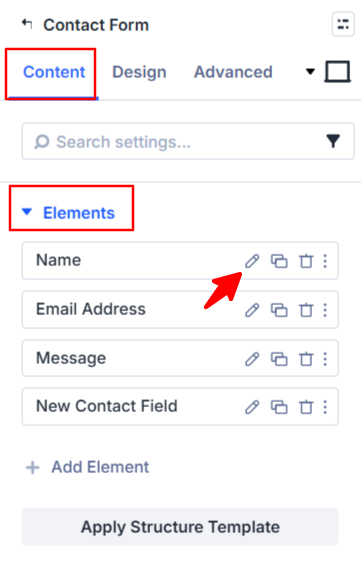
- Field settings will open.
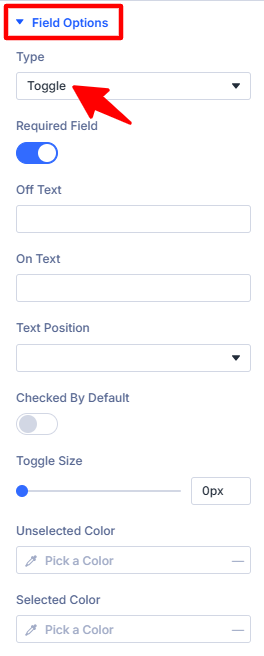
- Scroll down to the Field Options section.
- Type: Select toggle as the field type.
- Off Text: Add a label to display when the toggle is in the “off” state (e.g., “No”, “Disabled”).
- On Text: Add a label to display when the toggle is in the “on” state (e.g., “Yes”, “Enabled”).
- Text Position: Choose whether to display the On/Off text before or after the toggle switch.
- Checked By Default: Enable this option if you want the toggle to be turned on by default when the form loads.
- Toggle Size: Drag the slider to adjust the size of the toggle switch.
- Unselected Color: Select the color that the toggle will display when it is in the OFF.
- Selected Color: Select the color that the toggle will display when it is in the ON.
- After being satisfied with all the changes, click Save to apply the changes to your form.