

If you want to add a country & state field to your native Divi contact form, then you can add it easily using the Contact Form Extender for Divi plugin.
What is Country & State Field?
Country and State fields help you collect correct location details from users. This is useful when you need to know where your users are from.
For example, if you have an inquiry or support form for international customers, you can add a Country & State Field to let user select their country and state.
So, if someone selects the USA in the country field, they will then see a list of American states in the state field, making the form easier to use and the information more accurate.
Follow the steps below to add a country and state field to your form:
Add Country Field
* Firstly, make sure you have “Turned on“ the country field feature in the WordPress Admin Panel >> Divi >> Contact Form Extender >> Form Elements Tab.
- From the Elements section, click on the edit (pencil icon) of the field.
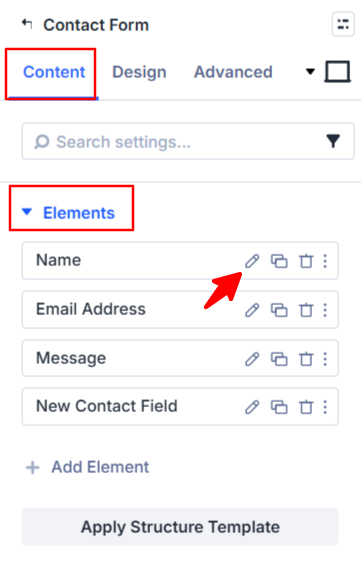
- Field settings will open.
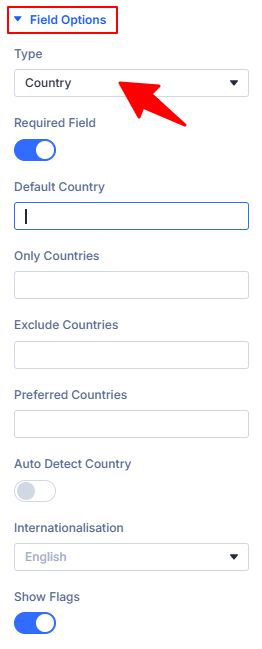
- Scroll down to the Field Options section.
- Type: Select country as the field type.
- Default Country: Set the default country to define which country should appear pre-selected in the field.
- Only Countries: Mention the list of countries that you want to include in the dropdown list. All other countries will be hidden.
- Exclude Countries: Mention the list of countries that you don’t want to appear in the dropdown.
- Preferred Countries: Set the order in which the countries must appear in the dropdown. The countries mentioned here will appear at the top of the list.
- Auto Detect Country: Enable this option to detect and pre-select the user’s country based on their IP address.
(Note: To enable this feature, you need to configure a Geo-IP provider and enter an API key. You can add the API key from the plugin settings in your WordPress admin dashboard: Divi > Contact Form Extender > Settings) - Internationalisation: Choose the language in which country names will be displayed.
- Show Flags: Enable this option to display country flags alongside country names in the dropdown.
Add State Field
* Firstly, make sure you have “Turned on“ the state field feature in the WordPress Admin Panel >> Divi >> Contact Form Extender >> Form Elements Tab.
- Choose “State” from the type section of the form field.
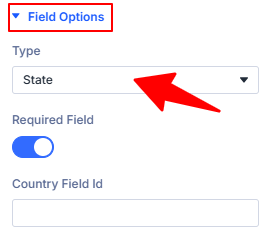
- Country Field ID: Enter the Field ID of the Country field you created earlier.
- After being satisfied with all the changes, click Save to apply the changes to your form.