


The Language Switcher for Polylang addon adds a dedicated Language Switcher module to Divi Builder.
You can add the module anywhere in your Divi layout and control how available languages are displayed, including flags, language names, codes, layout, text, background, sizing, and other design settings.
Follow the steps below to add the language switcher in Divi:
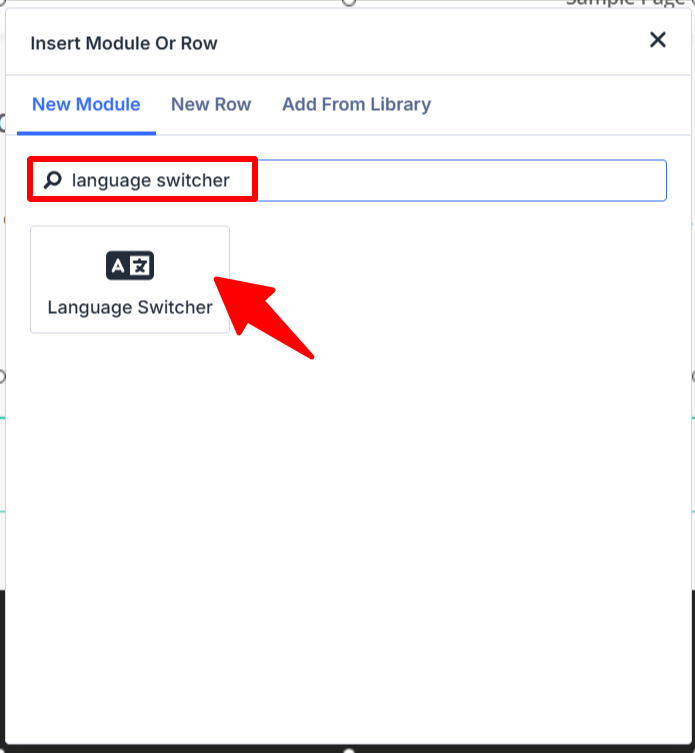
Add the Language Switcher Module
- Edit the page or template with Divi, where you want to add language switcher.
- From modules section, search for Language Switcher module, and add it to your layout.
Configure Language Switcher
The module settings are divided into Content, and Design settings.
Content Settings
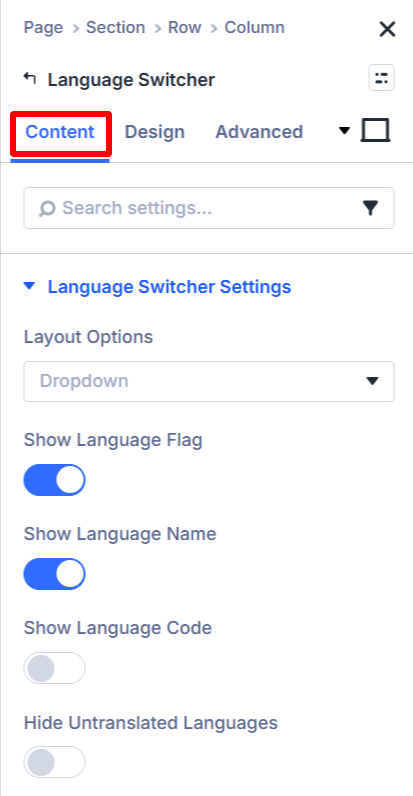
- Layout Options: Choose how the language switcher should be displayed:
vertical,horizontal, ordropdown. - Show Language Flag: Enable this option to display a flag next to each language.
- Show Language Name: Enable this option to show language names in the switcher, such as
English,French, orSpanish. - Show Language Code: Enable this option to display language codes, such as
EN,FR, orES. - Hide Untranslated Languages: Enable this option to hide languages that do not have a translated version of the page or post.
Design Settings
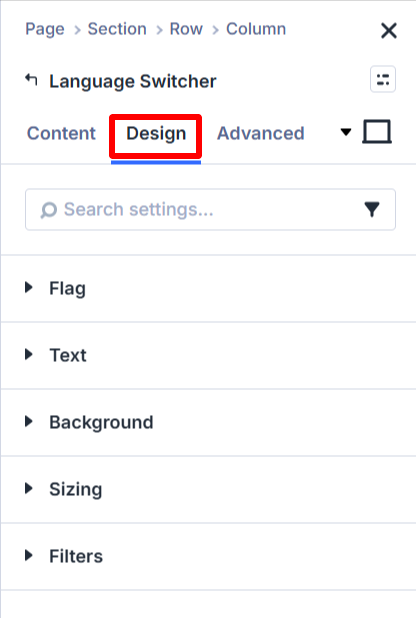
- Flag: Customize the appearance of the language flags displayed in the switcher.
- Text: Adjust the appearance of language names and other text in the switcher.
- Background: Customize the background of the language switcher.
- Sizing: Adjust the size and dimensions of the switcher.
- Filters: Apply visual effects to customize the appearance of the switcher and its elements.
Once you finish configuring the module, save or update the page to apply your changes.