

Using the Connect Polylang for Elementor plugin, you can easily translate Elementor templates and add a language switcher to your multilingual website.
Why Connect Polylang for Elementor Plugin?
Polylang is a multilingual plugin that helps you translate standard WordPress content. This approach works well with the WordPress editor but becomes limited when used with Elementor. It does not fully support Elementor templates, such as headers, footers, etc. Suppose you have translated templates in Elementor, but only the original template (for example, your main header) is displayed across your entire site, no matter which language the visitor chooses. Additionally, Polylang does not provide a dedicated language switcher widget.
Connect Polylang for Elementor solves this problem by acting as a bridge between Polylang and Elementor. It automatically links translated templates and ensures the correct template is displayed for each language and also adds a dedicated Elementor Language Switcher widget, allowing you to place a customizable language switcher anywhere on your site.
Install & Activate Plugin
- Log in to your WordPress dashboard.
- Navigate to the Plugins section.
- Search for the “
Connect Polylang for Elementor” plugin.
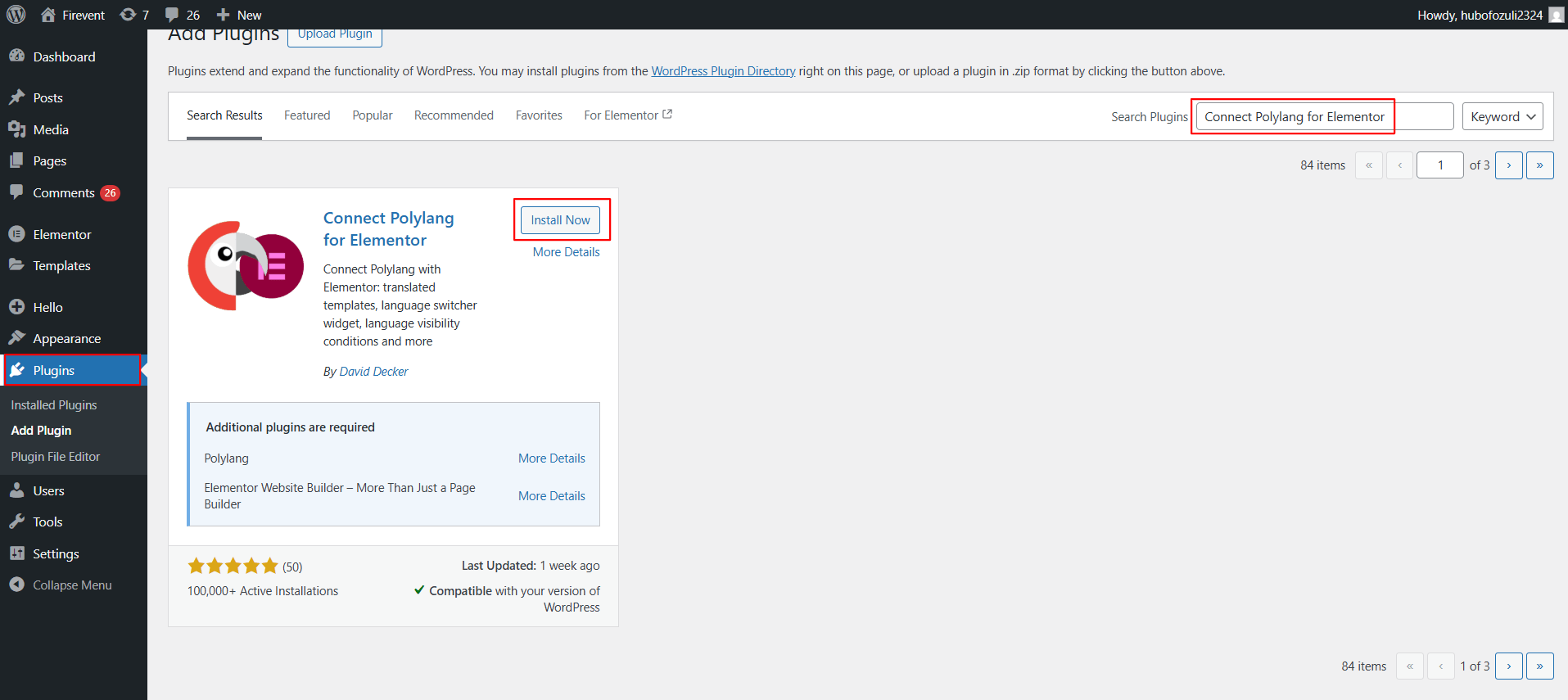
- Install & Activate it.
Once activated, you can start translating Elementor templates and adding a language switcher to your site.